The right digital signage screen depends on what you want to show, where it will be installed, and how long it needs to run, so choosing starts with three things: purpose, size, and placement. Bigger is not always better, but a screen that is too small can disappear into its surroundings and lose its impact. The aim is to make your content easy to see and useful to the people looking at it.
What Screens Are Used for Digital Signage?
Most digital signage runs on one of five screen types:
- Commercial LCD displays: the most common choice for menu boards, reception screens, and indoor promotions, built to run longer hours than a home TV.
- LED displays: built from modules and used for large indoor screens, video walls, shopfronts, and billboards where an LCD would be too small.
- High-brightness window displays: LCD screens with much higher brightness, so they stay readable through glass in daylight.
- Interactive touchscreens: for wayfinding, self-service kiosks, and product catalogues.
- Consumer TVs: workable for light indoor use with short hours, but not designed to run all day.
The right one depends on the job, the space, and how many hours the screen needs to run, which is what the rest of this guide covers.
Which Screen Suits the Job It Needs to Do?
A menu board needs to make prices and food images clear from where customers order, an entrance display needs to catch attention, and a passenger information screen needs dependable operation whenever people rely on it, so these three jobs will not automatically lead to the same type of screen.
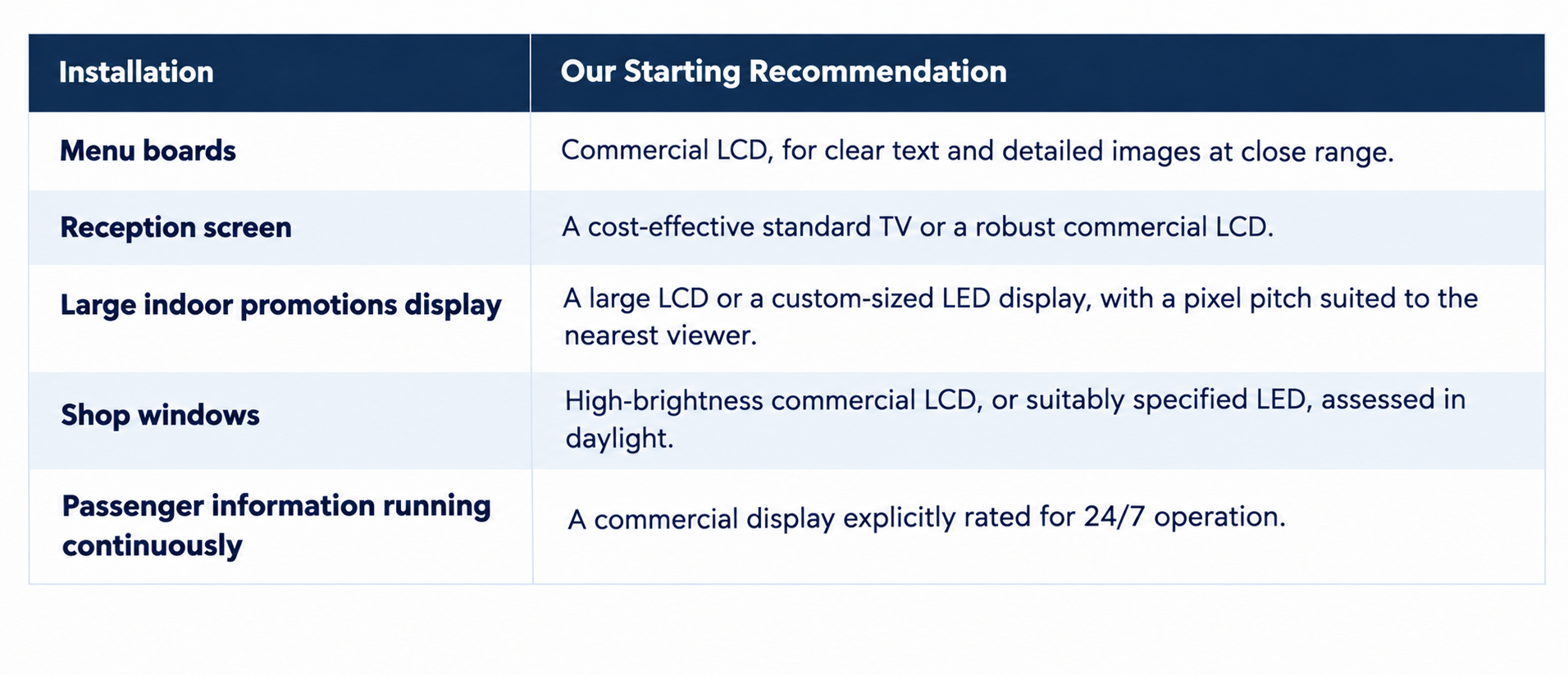
Before discussing brands or screen type, we ask clients what they want to achieve, how much space they have, how close people will stand, and how many hours the display will run. Our starting points for common installations are:
 How Do You Protect Your Brand and Your Space?
One of the biggest mistakes we see is installing a low-quality LED display in a high-end retail store. The interior might be beautifully designed, but if the images on the screen look pixelated or poor in quality, it can bring down the overall impression of the brand.
The same goes for having too many screens. More is not always better, and overcrowding a space with displays can make it feel more like a casino than a thoughtfully designed store. Not everything needs to be digital, so we recommend using digital signage where it adds real value, such as making it easier to update menus, prices, promotions, or important information.
Should You Use a Consumer TV or a Commercial Display?
In reality, both can work. A TV may be adequate in a controlled indoor environment with limited operating hours, but a home TV designed for a lounge is not automatically suitable for a business running all day.
Commercial-grade displays are designed for business environments, with features such as extended operating hours, portrait mounting, discreet branding, and scheduled power control. Specifications still vary between models, since some are rated for 16 hours a day, seven days a week (16/7) while others support continuous 24/7 operation, and brightness, glare reduction, and other features also differ. Some consumer TVs offer similar functions, so it is important to compare the specifications of each model.
Another consideration for South Africa is TV licensing. The SABC's business licensing guidance states that each TV set used on business premises requires a business TV licence. Ask whether the proposed display has a television receiver or a tuner, because the word "commercial" alone does not settle the licensing question. Our guide to TV licence requirements for digital signage in South Africa covers this in more detail.
Should You Choose LCD or LED Digital Signage Screens?
The terminology can be confusing, because most "LED TVs" are LCD screens with LED backlighting, while LED displays are built from LED modules, where the LEDs themselves create the image. To keep things clear, we refer to these as two types: LCD screens and LED displays. The other major differences are sizing options, price, and viewing distance.
We would normally recommend an LCD screen for sizes up to around 85", particularly when people will be viewing it up close. LCD screens provide sharp text and detailed imagery, which makes them a strong choice for menus, product information, and promotions, although image clarity still depends on the screen's resolution, content quality, and viewing distance.
For larger installations, LED displays are often the better choice. Examples include digital billboards along the N1 or large overhead screens in shopping centre food courts. For indoor promotions, such as a large display at a retail store entrance, we would typically recommend a custom-sized LED display with a pixel pitch of P2.5 or P1.8. These are practical guidelines rather than fixed rules, as the best option depends on the installation, viewing distance, and budget, and with the right pixel pitch LED displays can deliver sharp, high-quality visuals even when viewed up close.
LED also offers more flexibility in shape and size. Modules can be combined into large displays, portrait formats, or unusually wide layouts, and flexible modules can wrap around pillars and curved surfaces, which allows designs that standard LCD screens cannot easily achieve. If you run both types, our article on managing LCD and LED screens from one dashboard explains how.
What Is Pixel Pitch, and Why Does It Matter for LED?
Pixel pitch is the distance in millimetres between the centres of neighbouring pixels on an LED display, so P2.5 means the pixels are 2.5 mm apart. It can be used as a rough guide to viewing distance, but that does not mean the ideal viewing distance is 2.5 metres. A smaller pixel pitch packs more pixels into the same area, which gives sharper images when viewed up close, although it generally comes at a higher cost.
Viewing distance is an important consideration, because the closer someone stands to an LED display, the more likely they are to notice individual pixels. There is no universal viewing distance at which an image suddenly appears seamless, since text size, content quality, eyesight, and overall screen resolution all play a role. For a more technical explanation, see Planar's guide to pixel pitch.
How Do You Choose High-Brightness Screens for Shop Windows?
Our advice is to avoid using a standard TV for shop-window displays. Reflections on the glass and bright daylight can make promotions difficult to see, even if the screen looks perfectly clear indoors. Screens designed for brighter environments generally cost more, but they can make a big difference to visibility.
As a general guideline, we recommend considering LED displays for larger shop windows, typically around 1.5 metres wide or more, and high-brightness commercial LCD screens for smaller installations, although the best option depends on the size of the display, viewing distance, and location.
Screen brightness is measured in nits, and the required level depends on the site. Ask the integrator to assess daylight, reflections, direct sun, and heat behind the glass, because a standard commercial display is not necessarily a window-facing model, and an indoor screen is not automatically suitable outdoors.
What should you check before buying a window-facing screen?
Run through this checklist before you buy:
- Brightness: a standard indoor screen is typically around 350 to 500 nits. For a window, look at 2,500 nits or more, and higher still if the glass gets direct sun.
- Panel type: ask for a high-TNI panel, which resists the dark patches a standard LCD can develop when the sun heats the screen.
- Heat and ventilation: leave a gap between the screen and the glass so heat can escape, and check the screen's operating temperature range.
- Glare: an anti-reflective finish helps, but position matters more, so check the screen at the brightest time of day.
- Viewing side: confirm whether the screen faces the street, faces into the store, or both. Double-sided window displays are available.
- Automatic brightness: an ambient light sensor dims the screen after dark, which saves power and extends panel life.
- Operating hours: window screens usually run all trading hours, so check the duty rating (16/7 or 24/7).
- Size: for windows wider than about 1.5 metres, consider an LED display instead.
When Do You Need a Screen Rated for Continuous Operation?
For passenger information in an airport or cruise terminal, we would strongly recommend a commercial screen rated for 24/7 operation wherever continuous service is required. Think of environments such as Cape Town International Airport or the V&A cruise terminal, where the deciding factor is the importance of the information and the hours it must remain available.
A 24/7 rating does not guarantee that a screen will not fail, so the installation also needs a clear support process, which means someone knows what to do if the screen stops displaying information.
How Long Do Digital Signage Screens Last?
In our experience, a quality screen can serve a business for more than five years, although that is an expectation to assess, not a promise. A three-year warranty is common across commercial LCD ranges, but buyers should confirm the local warranty for the exact model and intended use.
Ask for the screen's rated lifetime in operating hours and what that rating actually measures. Manufacturer lifetime figures may describe brightness degradation rather than the date the entire screen will fail, and LG, for example, suggests a 50,000-hour lifetime figure for selected signage screens. To put hours into context, a hypothetical 50,000-hour rating works out as follows, assuming the screen runs every day: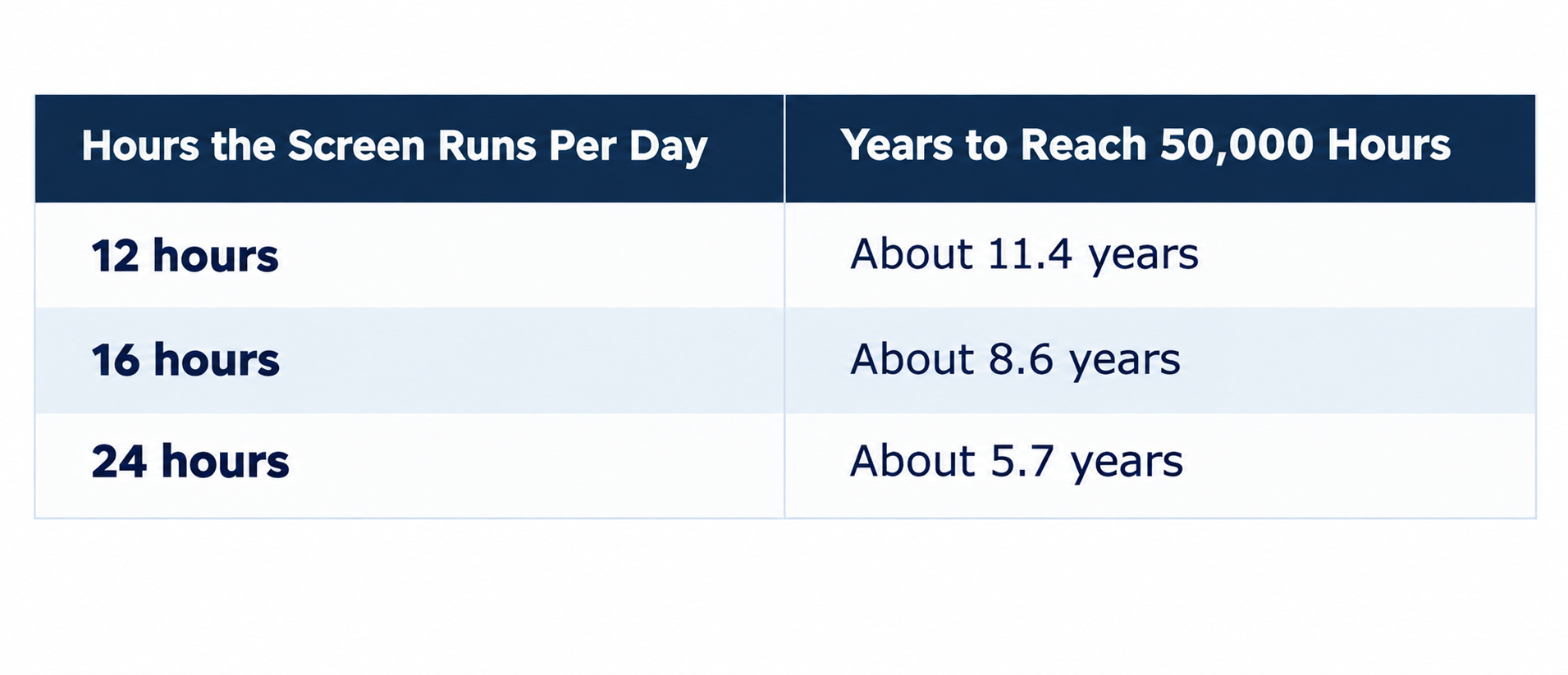 Heat, maintenance, brightness settings, and other components will affect the outcome. LED displays can also provide long service, but individual LEDs or modules may deteriorate or fail, so ask about replacement parts, access for repairs, and colour matching between replacement modules and the existing display.
Before accepting a quote, ask what happens during a warranty claim: who removes the display, who pays for transport and labour, how long repairs usually take, and whether a temporary replacement is available. Ask the integrator about their experience and failure history with that model as well.
How Do You Check Software Compatibility Before Buying?
Our preference is an all-in-one screen with a system-on-chip (SoC). This means the operating system and playback hardware are built into the LCD screen, so there is no separate media-player box or HDMI connection to manage.
Imagine runs directly on compatible LG commercial webOS signage displays and supported Android-based screens. An LG consumer TV is not the same as an LG commercial signage display, and smart TVs are not supported. Contact us with your make and model and we will confirm compatibility, or view our supported digital signage hardware page, which sets out the requirements.
If you already own a suitable screen or have an LED display, an external compatible Android or LG webOS media player connected through HDMI can be a sensible route. It adds components, but it may avoid replacing working displays and lets one software platform control both the LCD and LED displays.
What Should You Do Before You Commit to a Screen?
Digital signage can be matched to a budget, but it helps to understand where the compromises sit. A cheaper screen may be perfectly adequate for a modest indoor job, whereas in a demanding location buying on price alone can mean replacing it sooner than expected, or paying twice to get the result you wanted.
When speaking to our team or an integrator, share:
- What you want the screen to achieve, with sample content
- Photos of the location, the available width and height, and the nearest viewing distance
- Daily operating hours, preferred orientation, and any sunlight, heat, or steam exposure
- Your budget, existing equipment, and expectations for maintenance and support
Arrange a site visit where the location needs a closer assessment, because the more your integrator understands, the better their recommendation is likely to be. Speak to the Imagine team before you buy, so your screen, software, and installation suit the job from the start.
---
Frequently Asked Questions
What does P2.5 mean on an LED display?
P2.5 is the pixel pitch, meaning the pixels are 2.5 mm apart. A smaller number packs more pixels into the same area and gives a sharper image up close, usually at a higher cost. It does not mean the ideal viewing distance is 2.5 metres, because text size, content quality, and eyesight also play a role. Planar's guide to pixel pitch explains it in more detail.
How many years is a 50,000-hour screen rating?
Assuming the screen runs every day, 50,000 hours is about 11.4 years at 12 hours a day, 8.6 years at 16 hours a day, and 5.7 years at 24 hours a day. Heat, maintenance, brightness settings, and other components will affect the outcome, and manufacturer figures may describe brightness degradation rather than total failure. Our guide to the best digital signage hardware explains how to match a screen to its environment.
Do commercial displays need a business TV licence?
The SABC's business licensing guidance states that each TV set used on business premises requires a business TV licence. The word "commercial" alone does not settle the question, so ask whether the display has a television receiver or a tuner. Our guide to TV licence requirements for digital signage covers it in more detail.
Does Imagine run on LG consumer TVs?
No. An LG consumer TV is not the same as an LG commercial signage display. Imagine runs directly on compatible LG commercial webOS signage displays and supported Android-based screens, so send the team your make and model and they will confirm compatibility. The supported hardware page sets out the requirements.
What should you ask about a screen warranty claim?
Ask who removes the display, who pays for transport and labour, how long repairs usually take, and whether a temporary replacement is available. It is also worth asking the integrator about their experience and failure history with that model. Our guide to finding a good digital signage integrator lists more questions to ask.